Have you grown tired of being muzzled by your internet service provider - not allowed to visit websites for political reasons? Are you in an oppressive country that blocks your access to free and open discussion of important social issues? Would you like to use computers at public internet cafes without being subject to internet filters, surveillance, spyware, or malware? Would you like to use your own operating system on public computers and leave no usage tracks and block surveillance of your activities? If yes, then "MOFO Linux" is your solution. MOFO Linux is secure, free (as in freedom and beer), and effective in penetrating "national firewalls" designed to inhibit freedom of speech. This is a tool designed to help you be in touch with anyone or access any media if there is internet service.
Note: MOFO Linux is now updated to version 8.3! Visit the MOFO Linux home page to get the latest info and download. Censorship no longer works, anywhere. Learn how to use circumvention and anonymity tools!
MOFO Linux is an operating system organized around the purpose of defeating all methods of internet censorship and surveillance used by governments, corporations, schools, and internet service providers. It is a tool created to empower people for exercising their unalienable rights to privacy, freedom of expression, association, and peaceful assembly. These are Creator endowed rights, not privileges to be metered out at the whims of any government; protected by the International Covenant on Civil and Political Rights and the Universal Declaration of Human Rights. The mission of MOFO Linux is to give you the power to unblock any media, at your discretion, clearing the way for you to read, write, watch, listen to, debate, or collaborate beyond the reach of Big Brother.
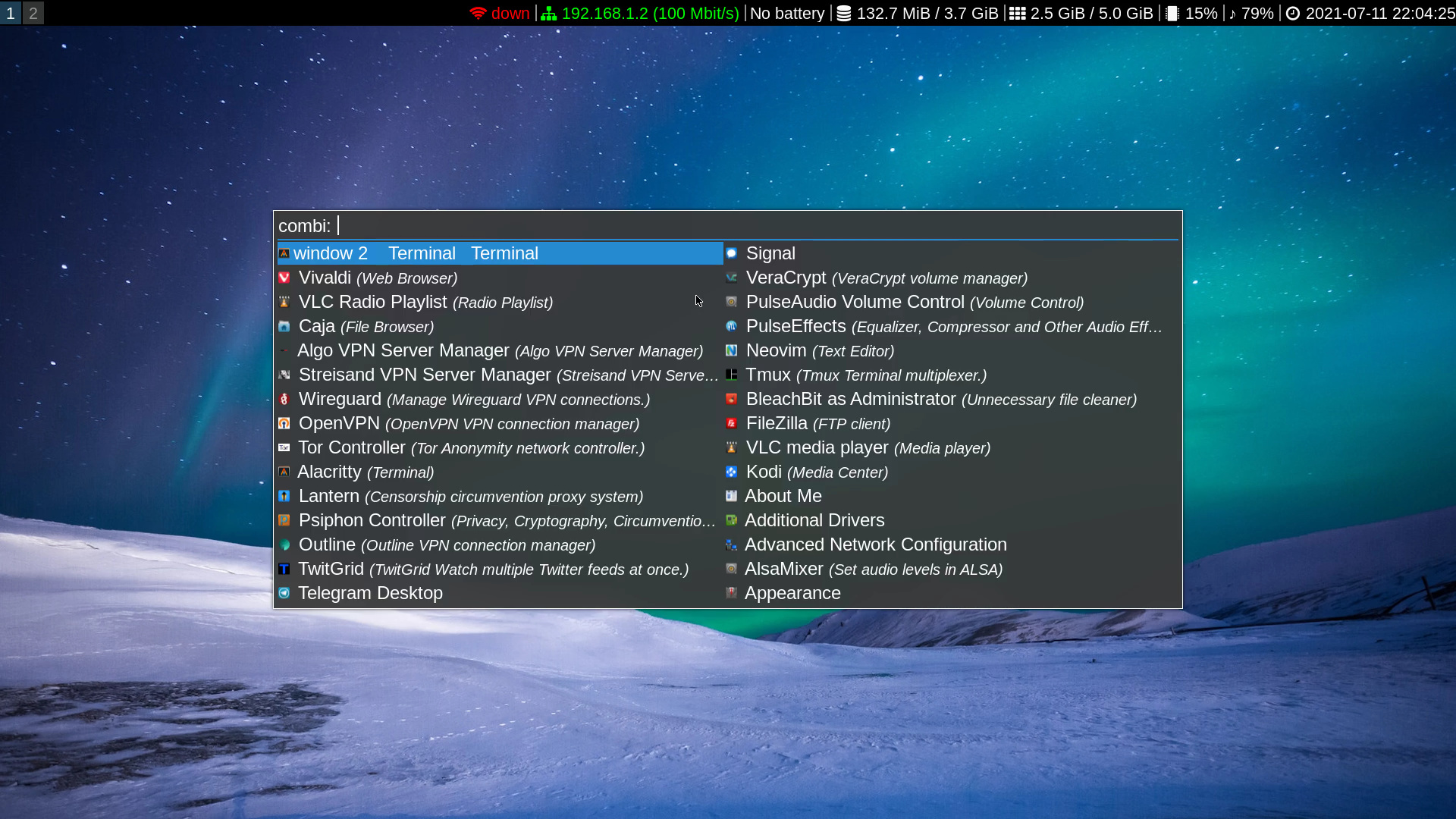
MOFO Linux 8, with i3 window manager and
Rofi, with lots of VPNs and Proxies.
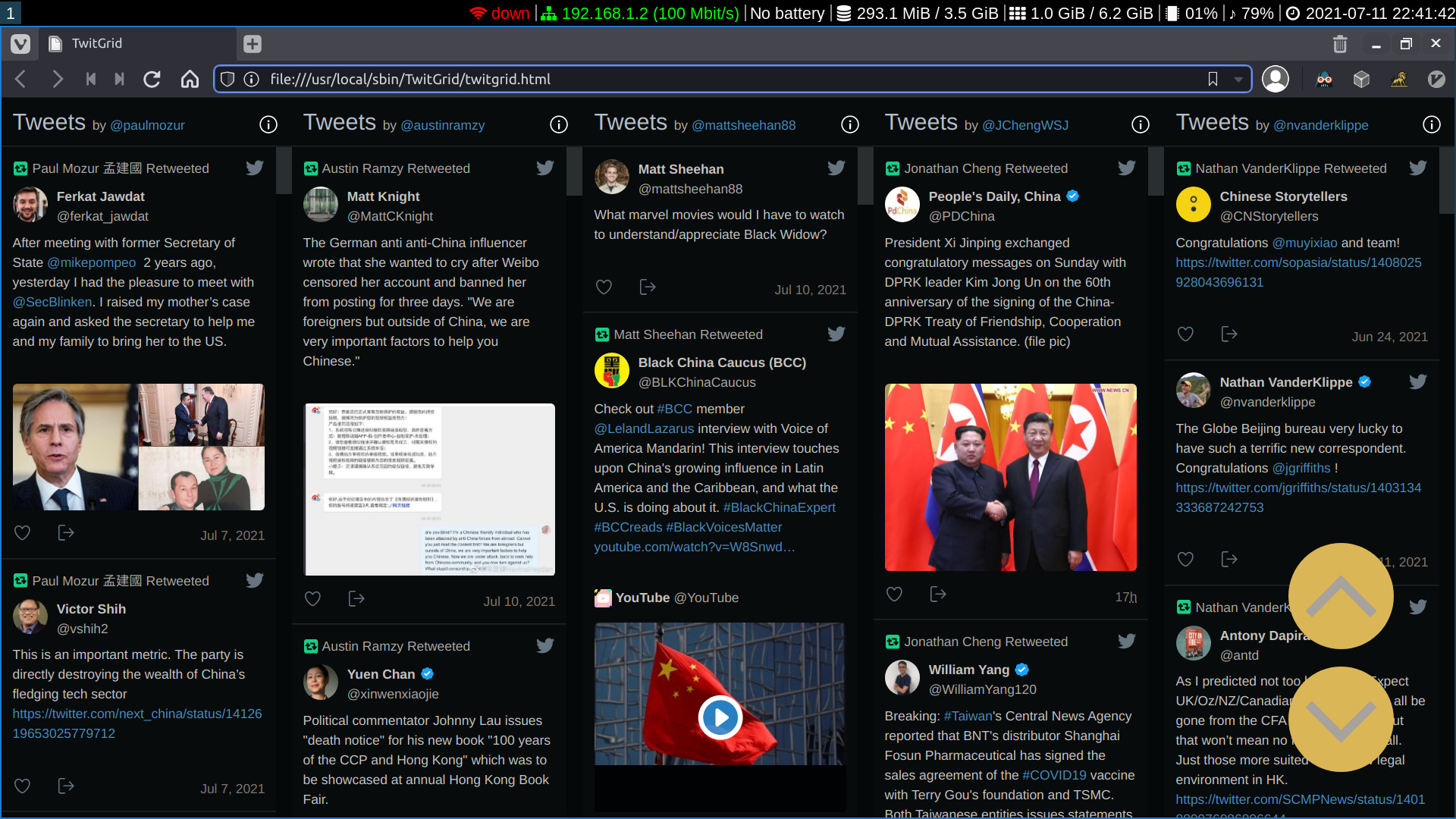
MOFO Linux 8, running TwitGrid. That is FIVE
Twitter feeds shown in the browser.
MOFO Linux is designed for easy usage on home PCs, laptop computers, or workstations, whether installed in internet cafes anywhere the world or on the most modest of home desktop machines. It is a collection of office, multimedia, web browsing, file sharing, and internet messaging applications assisted by a collection of tools for breaking through any censorship barriers. They do not all work 100% of the time, but there is always at least one tool which the authorities cannot block.
MOFO Linux contains Encrypted DNS over TLS, OpenVPN, Tor, Freenet, I2P, and other software tools which provide anonymous and / or secure access to the internet and circumvention of state censorship restrictions. The system is designed to run from a bootable USB stick or "frugal install" on a hard drive or SSD. It also runs great in a virtual machine. Browsing history and usage tracks are destroyed on shutdown.
SSH Tunnels and Domain Fronting Proxies
Consider using an SSH Tunnel for your basic censorship circumvention method. It works in even the most restrictive environments because SSH is an essential network tool authorities are reluctant to block. To use it, you need SSH access to a remote server, which itself has access to the open internet. MOFO Linux has a tool called Sshuttle for securely accessing the internet through remote servers. The implementation in MOFO Linux requires you to set up key based server logins and also Edit your server data to save the IP, user, and SSH port.
Domain fronting is a technique of setting up proxies or VPNs on important domains the attacker is unable or unwilling to block. Lantern works well in restricted internet environments. Simply open Rofi and find Lantern in the list of applications. Start Lantern and it will automatically connect to remote servers and provide fast, unrestricted internet access through the web browser.
Psiphon is a circumvention system effective against sophisticated state censorship stystems. MOFO Linux uses a part of it called "psiphon-tunnel-core." Access Psiphon Rofi's application list and click to bring up the controller. Select "start" or "stop" as necessary, and the controller will handle the configuration process.
VPNs: Wireguard and OpenVPN
WireGuard is the newest VPN added to MOFO Linux, described by its developers as lean, fast, and simple. It is also cryptographically effective and robust. Multiple encryption protocols are built in, and WireGuard is respected by professionals in the industry. Set up your own server or use a commercial service offering the protocol.
Keep your Wireguard config files in a safe location separate from MOFO Linux. To use, copy the configs to the home folder, open a terminal, and run the command wgxfr. Tab select and hit Enter to copy the configs into /etc/wireguard. Connect to the Wireguard VPN by executing wgup in the terminal or instead bring up Rofi and launch the Wireguard application.
OpenVPN is supported in MOFO Linux. To use the protocol, follow these steps:
- If you don't have a subscription to an OpenVPN provider, simply use the free servers at https://vpngate.net. Open a terminal and execute sudo vpngate list to bring up the application and download a list of servers. You may then execute sudo vpngate connect to make a VPN connection in the VPNGate ecosystem. If OpenVPN is blocked in your country, use other applications to unblock your internet.
- Keep a copy of your ovpn, key, ca, and crt files on a separate USB flashdrive or SD card. Use the OpenVPN Controller application to locate and open the desired ovpn file. For convenience, you could copy your VPN credentials to the home directory. If getting your configs from VPNGate, be aware that the keys and certificate data are contained within one ovpn file.
- NetworkManager can also manage OpenVPN connections. Left click the wifi or ethernet section of the status bar, select "Launch Connection Manager," and then select the "+" to add a new OpenVPN connection. NetworkManager will not work with the VPNGate "single ovpn" files, which contain the combined certificate and key data. Use the vpngate terminal application for servers operated by VPNGate volunteers.
Algo, Streisand, and Outline Circumvention Systems
Algo is "a VPN that works" as described by its developers. As with Streisand and outline, Algo handles the rapid creation and management of VPN servers. Algo focuses narrowly on IPSEC and WireGuard protocols, asserting that those two are most effective against present day threats.
Streisand, humorously, gets its name from the "Streisand effect," where attempts to attempts to suppress attention to a sensitive actually draws more attention. The circumvention system gets its strength from easily enabling users to set up, manage, and take down their own VPN servers in a matter of minutes, with many different protocols available.
Outline is a system created by the people at Jigsaw, applying new technology to make a safer world. Users set up their own servers in minutes, configured with VPNs based on shadowsocks tunnels. If you do not want to set up your own server, Outline can still connect to shadowsocks servers. Set up an account on a provider and paste the configuration data into the Outline Client. It is so easy: Outline can copy configuration data from your clipboard if you use a provider with the "copy to clipboard" option.
Tor, I2P, and Freenet: Darknet / Anonymous Networking
Tor is the oldest and most well developed anonymous network, with extensive infrastructure providing strong anonymity to internet users. I2P is a newer robust privacy and anonymity network. It contains quite a lot of content and services for its users, all resistant to surveillance and censorship. Freenet is an active, decentralised anonymous network designed such that it is impossible to censor and extremely resistant to surveillance. These networks contain internally reachable anonymized websites, chat areas, forums, markets, and exit nodes to the open internet.
NOTE: Tor is installed in MOFO Linux, but you should be very careful with it. Merely using it from your home IP address can get you targeted for surveillance. Consider setting up a remote server where you can install Tor and access the darknet from there. Use a VPN or simple ssh tunnel to connect to that server from your home IP. Vivaldi is the default browser in MOFO Linux, and there is no Tor Browser. In this era, it is smart and far less risky to have a sensibly configured browser on your own machine and, I repeat, run Tor on a remote server. If you are willing to run it locally, you can defeat blocking attempts by using Torsocks or Pluggable Transports (Meek-Azure and Obfs4), or Proxychains.
For I2P, use the I2P Controller application. Use the controller to shut down I2P and restore proxy settings for normal web browsing after the I2P session is finished.
In MOFO Linux, Freenet is configured to install freshly from its java package. Use the "Freenet Installer" application to set it up for the first time. To stop or restart Freenet, use the buttons within its main browser page.
Interplanetary File System (IPFS)
The Interplanetary File System is technology providing a robust, decentralised internet based on content of files instead of where they are located, similar to BitTorrent - but better. Applications and data on IPFS are permanent and distributed - with no single point of failure or vulnerability to censorship. Media files, databases, websites, archives on IPFS can exist with resiliance and be accessed with high speed. IPFS-Desktop is the application to use for managing files in IPFS or setting up a local IPFS node. Because MOFO Linux does not have persistence, you must back up your IPFS files configs, and credentials on external media before shutting down MOFO Linux. Consider an "IPFS pin service" to host things you want others to access (or pin an encrypted file for your eyes only).
File System Encryption: Veracrypt and EcryptFS
Veracrypt is the top multi-platform software for VERY STRONG file system encryption forked from Truecrypt. It has great features and performance - able to encrypt drives and directories, even hiding them from detection. It is compatible with Linux, Windows and Mac systems, so encrypted files may be created or accessed on just about any computer.
Ecryptfs is an encrypted filesystem with support built into the Linux Kernel. It is fast, strong, and efficient enough to keep your files safe from unwanted access. Use it to encrypt folders or whole drives which will hold sensitive data. Ecryptfs is the principal means of encrypting the home directory and other storage volumes in Linux.
It is suggested that users run MOFO Linux from a bootable flash drive and keep a separate flashdrive partition for encrypted files. Another option is to use a separate drive and encrypt its entire contents, accessing it through Veracrypt. Doing that, it is possible to carry a large volume of data which is quite difficult to detect and even more difficult to decrypt. In theory, a well-arranged encrypted volume should be secure for centuries. Be careful to create strong passwords. Do not allow any secret keys to be compromised. Use Bleachbit to wipe free space on your storage media.
Instant Messaging Clients
- Signal provides secure, end to end private messaging, supporting text, voice, video, and file attachments.
- Element is a decentralised and encrypted instant messaging platform, enabling people to connect and collaborate securely over voice, text, and video.
- Telegram is a cloud based private messaging service supporting one on one or group communications.
- Irssi is a terminal based internet relay chat (irc) application for anyone wanting to go "old school" in text based communication.
Multimedia with Enhanced Audio
Kodi Media Center provides access to THOUSANDS of high quality video and audio streams from around the world. Multimedia apps may be enhanced by PulseEffects for systemwide audio equalization, compression, and limiting for extra punch in home theater / office presentation environments.
Radio stations around the world are available for direct, off the air listening via hundreds of software defined radio (SDR) servers. Vivaldi contains a bookmarked list of top SDR servers around the world. They are like a "radio in your web browser" for tuning in news, music, political, and religious content on an unlimited global scale. Also, the VLC Media Player can stream podcasts, internet radio, and video from around the world. Castero is a podcast client which runs in your terminal and plays audio through VLC. There is also a VLC Radio playlist set up with dozens of popular broadcasters which stream from their studios direct to your computer.
Command Line Tools
MOFO Linux contains a plethora of efficient and fast command line tools.
- Neovim is a pleasure for writing and programming because it is so fast and customisable with plugins.
- Browsing the web is a breeze in text mode with W3M. Navigate pages with Vim-like keys and enjoy cleaner, stripped text using the Readability utility.
- Surfraw is a search tool providing well over a hundred different websites to access for information not easy to find on the major portals. You can look for aircraft in flight by registration or ADSB hex code, find answers to computing or math problems, or even do lookups of slang phrases or rumors appearing in the news.
- TwitGrid pulls multiple Twitter feeds and displays them as a broadsheet in Vivaldi. Here, it is set up in "topics." You select a topic and watch five feeds, updated at regular intervals.
- lf is a fast and efficient terminal file manager. Navigate with Vim-like keys, with previews and user configurable management commands.
- fzf, ripgrep, and fd are tiny yet very effective tools for searching and organizing files or text. With these, you can reach into dozens or hundreds of files to recursively find words, phrases, code, or even terminal command history.
Multiple Language Support
MOFO Linux defaults to English on startup, with ability to change the system to other languages, including Chinese and Arabic. Multilanguage keyboard input is always available. To change the system language, select it in Language support, then exit and recycle your session with CTRL + ALT + BACKSPACE without turning off the computer. The new language will then be activated. Language support in Vivaldi may be managed by using the Tools -> Addons -> Languages menu.
Usage and Installation Options
MOFO Linux is built to run as a live environment. Write it to a flash drive or virtual machine and go forth to do great things. It is possible to install the system as a persistent, uncompressed filesystem on your hard drive. See these options:
- TimeShift is installed. From the live environment, back up the system to a separate medium. Thence, restore the backup as an uncompressed filesystem to the medium you want to operate from in daily computing. Systemback is another option, with the same method: back up to a separate medium then restore onto your working medium.
- Clone it to the hard drive as a regular, uncompressed operating system with the included linux-clone script.
- In Linux or Windows, create a bootable USB or SD card using Ventoy.
- Run the iso in a virtual machine under Virtualbox, VMware, or in Qemu.
Ventoy is capable of creating multiboot drives, so you can Use multiple operating system iso images for different computing tasks. You can create a persistent image file, with the label casper-rw, for persistent settings across reboots. See the Ventoy site for details on setting it up!
It is not recommended to burn an actual DVD to run any live computing environment. It is far, far too slow! Use a flash drive or SSD. For ultimate performance, clone the environment to a regular uncompressed file system.
Technical Notes
MOFO Linux is a 64 bit system, derived derived from Ubuntu 20.04 LTS, which is itself derived from Debian Linux. MOFO Linux uses the MATE desktop environment and the i3 window manager to provide users with an effieient workflow light on resources. It carries The capabilities of its parent distros: easy software updating, great graphics, system resource management, and adaptability to user needs. The default username is mofo and there is no password in the default system. The system runs quite well on modest hardware, and truly shines on strong multi-Core CPUs with abundant memory.
Integrity and Authenticity of MOFO Linux
Great effort goes into making MOFO Linux safe and free of malware. To verify that your copy of the iso image file is authentic, undamaged, and unaltered, check its sha256sum against the official authentication document and verify the digital signature of MOFO Linux. The authentication document is available by the download link at MOFO Linux.com. Use the Passwords and Keys or Seahorse application to check the signature. Import the MOFO Linux public key from pool.sks-keyservers.net or keyserver.ubuntu.com.
Disclaimer
MOFO Linux is provided as-is. No guarantees or warranties are applicable to MOFO Linux. Much of the software is beta, may be subject to countermeasures, or blocked by adversarial internet providers. Use of software in MOFO Linux is solely at the user's own discretion and risk. You, the users, are responsible for content accessed. MOFO Linux is not endorsed by or affiliated with Ubuntu / Canonical / Debian GNU/Linux.
Further Information:
Website: https://mofolinux.comSourceForge: https://sourceforge.net/projects/mofolinux/
Application Source Code: App Source Code
MOFO Linux Changelog:
Version 8.0:- Base System: Ubuntu 20.04.2 LTS
- Linux Kernel 5.10.35-rt39-xanmod1
- MATE Desktop Environment 1.24.0
- Alacritty 0.8.0
- Bleachbit 4.1.0
- Castero 0.9.2
- Element Desktop 1.7.32
- eCryptfs-utils 111
- Freenet Installer 1489
- i3 Window Manager 4.19.1
- i3ass 2021.05.29 Ghostbusted
- IPFS-Desktop 0.14.0
- Kodi Media Center 19.1
- Lantern 6.5.7
- NextCloud 3.2.3
- Newsboat 2.18
- OnionShare 2.2
- Openjdk-11-jre 11.0.11
- Outline-Client 1.3.0
- Outline-Manager 1.8.0
- Proxychains 4.14
- Psiphon-Tunnel-Core Linux Client 2021-04-27 (build 4b4bcc70)
- PulseEffects 4.8.2
- Python 2.7.18 (supporting certain legacy applications)
- Python 3.8.10 (supporting system and user applications)
- Signal Desktop 5.8.0
- Telegram-cli 1.3.1
- Telegram-desktop 2.1.7
- Telegram-purple 1.4.1
- Thunderbird 78.11
- Tor 0.4.2.7
- Torsocks 2.3.0
- VeraCrypt 1.24
- Vivaldi 4.0.2312.38
- W3M 0.5.3
- Zathura 0.4.5
© 2005 - 2025 AB9IL.net, All Rights Reserved.
Written and curated by Philip Collier / AB9IL.
About Philip Collier / AB9IL, Commentaries and Op-Eds, Contact, Privacy Policy and Affiliate Disclosure, XML Sitemap.
This website is reader-supported. As an Amazon affiliate, I earn from qualifying purchases.