Quadrature Sampling software defined radios are nifty proof-of-concept devices. Crystal controlled versions, such as the Softrock devices, are especially good for weak signal work, and are proven formidable DX grappers when paired with good SDR software and a skilled operator. Elaborate implementations, such as the SDR-1000 family of transceivers are expanding the limits of possibility with quadrature sampling software defined radio equipment.
Here is a method of running several of these radios simultaneously, using multiple audio interfaces. Running two or three separate A/D interfaces at once can be a very difficult task on some of the popular operating systems, and sometimes resembles the masochistic art of cat herding! It is not difficult to use multiple soundcards in Linux; they can be tied together as one multichannel virual device. Such a multichannel audio interface would be useful in a software defined radio monitoring station or club. Imagine handling a batch of eight different "softrock" receivers tuned to different hf aeronautical radio bands. Or consider an emergency communications station running several modes and frequency ranges at once. What is proposed here is using one computer system, suitable software, and several audio interfaces to create a software defined superstation.
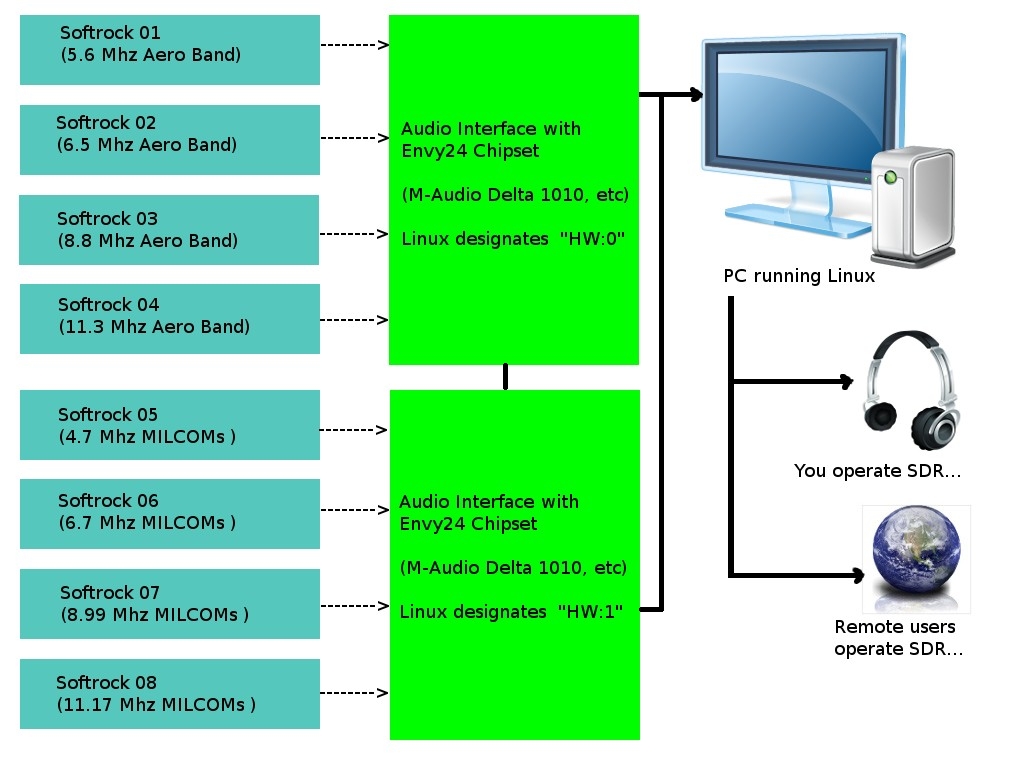
A multichannel / multiband / multiuser SDR
system with a virtual mega-sound card
Be aware that there are a number of direct sampling SDRs with multichannel capability. Using several quadrature sampling SDRs is a good option in many cases, considering up-front cost and ability to scale the system up or down. Also, the A/D converters in modern audio interfaces offer phenomenal quality 24 bit sound.
The information to follow specifically describes how to operate multiple audio interfaces which use the Envy24 chipset. Under Linux, they use a driver known as ice1712. Chaining the interfaces requires editing of ALSA configuration files and sending proper start-up commands to the Jack Audio routing system.
ALSA .asoundrc Configures Your Audio
The ALSA pcm_multi plugin is used to merge several cards into one large virtual
card. Note that the ICE1712 actually has 12 inputs and 10 outputs, and these must
be defined in software, regardless of the number used on a particular make and model
of audio interface. Therefore, separate devices will be defined in the
.asoundrc file for capture and playback. For a 16 channel audio system, see the
.asoundrc example for two M-Audio Delta 1010 interfaces:
# .asoundrc for two Delta 1010 audio interfaces
#
# Create a virtual multichannel device out of multiple soundcards.
# JACK must have MMAP_COMPLEX support enabled.
# ICE1712 chip has 12 capture channels and 10 playback channels.
# Number of channels in slave devices must equal 12 for capture and 10 for playback
# otherwise "invalid argument" errors result.

pcm.multi_capture {
	type multi
	slaves.a.pcm hw:0
	slaves.a.channels 12
	slaves.b.pcm hw:1
	slaves.b.channels 12

# First 8 channels of first soundcard (capture)
 	bindings.0.slave a
 	bindings.0.channel 0
 	bindings.1.slave a
 	bindings.1.channel 1
 	bindings.2.slave a
 	bindings.2.channel 2
 	bindings.3.slave a
 	bindings.3.channel 3
 	bindings.4.slave a
 	bindings.4.channel 4
 	bindings.5.slave a
 	bindings.5.channel 5
 	bindings.6.slave a
 	bindings.6.channel 6
 	bindings.7.slave a
 	bindings.7.channel 7

# First 8 channels of second soundcard (capture)
 	bindings.8.slave b
 	bindings.8.channel 0
 	bindings.9.slave b
 	bindings.9.channel 1
 	bindings.10.slave b
 	bindings.10.channel 2
 	bindings.11.slave b
 	bindings.11.channel 3
 	bindings.12.slave b
 	bindings.12.channel 4
 	bindings.13.slave b
 	bindings.13.channel 5
 	bindings.14.slave b
 	bindings.14.channel 6
 	bindings.15.slave b
 	bindings.15.channel 7

# S/PDIF section. Uncomment bindings if required.

# S/PDIF first soundcard (capture)
 	#bindings.16.slave a
 	#bindings.16.channel 8
 	#bindings.17.slave a
 	#bindings.17.channel 9

# S/PDIF second soundcard (capture)
 	#bindings.18.slave b
 	#bindings.18.channel 8
 	#bindings.19.slave b
 	#bindings.19.channel 9
}

ctl.multi_capture {
	type hw
	card 0
}

pcm.multi_playback {
	type multi
	slaves.a.pcm hw:0
	slaves.a.channels 10
	slaves.b.pcm hw:1
	slaves.b.channels 10

# First 8 channels of first soundcard (playback)
 	bindings.0.slave a
 	bindings.0.channel 0
 	bindings.1.slave a
 	bindings.1.channel 1
 	bindings.2.slave a
 	bindings.2.channel 2
 	bindings.3.slave a
 	bindings.3.channel 3
 	bindings.4.slave a
 	bindings.4.channel 4
 	bindings.5.slave a
 	bindings.5.channel 5
 	bindings.6.slave a
 	bindings.6.channel 6
 	bindings.7.slave a
 	bindings.7.channel 7

# First 8 channels of second soundcard (playback)
 	bindings.8.slave b
 	bindings.8.channel 0
 	bindings.9.slave b
 	bindings.9.channel 1
 	bindings.10.slave b
 	bindings.10.channel 2
 	bindings.11.slave b
 	bindings.11.channel 3
 	bindings.12.slave b
 	bindings.12.channel 4
 	bindings.13.slave b
 	bindings.13.channel 5
 	bindings.14.slave b
 	bindings.14.channel 6
 	bindings.15.slave b
 	bindings.15.channel 7

# S/PDIF section. Uncomment bindings if required.

# S/PDIF first soundcard (playback)
 	#bindings.16.slave a
 	#bindings.16.channel 8
 	#bindings.17.slave a
 	#bindings.17.channel 9

# S/PDIF second soundcard (playback)
 	#bindings.18.slave b
 	#bindings.18.channel 8
 	#bindings.19.slave b
 	#bindings.19.channel 9
}

ctl.multi_playback {
	type hw
	card 0
}
It is also possible to use the ALSA route plugin to interleave the blocks of audio data channels so MMAP_COMPLEX isn\'t needed, but the route plugin will increase latency to unacceptable levels.
Starting the JACK Audio Routing System
Jack Audio is software used to route digital audio within a computer system. It can connect
any source of audio data to any user of audio data on a system, including DSP applications,
audio editors, media players, software defined receivers, speakers, headphone jacks, et cetera.
Jack Audio can be started, at a 48 kHz sampling rate, using the following command-line syntax:
$ jackd -d alsa -r 48000 -C multi_capture -P multi_playbackor with realtime privileges:
$ jackd -R -d alsa -r 48000 -C multi_capture -P multi_playback
If one of the graphical interfaces for jack, such as qjackctl are used, be sure to invoke the multicapture and multiplayback options at startup.
Synchronizing Audio Interfaces
Running multiple audio interfaces as one virtual multichannel device requires their word clocks operate in sync. This can be done by connecting the word clock output on the first interface to the word clock input on the second one, and so on. Alternatively, interfaces like the Delta 1010 can be linked via S/PDIF (connect the S/PDIF output on the first card to the S/PDIF input on the second card). In fact, it seems to be a more effective way to sync the clocks. Envy24control from the alsa-tools package should then be used to configure the first interface to use its internal clock and the other interfaces to use their word clock inputs or S/PDIF. Other audio interfaces without word clock connections can be synchronized via the SPDIF in/out.
Another excellent word clock synchronizing method is to use a splitter, and use first interface\'s S/PDIF clock signal to drive the others in parallel. The word clock on card 1 should be set to \'Internal\' and for all of the other cards, set to set the word clock to \'SPDIF in.\'
Once the data streams are synced and fed to the computer, any of the popular SDR software packages may be used to decode and display the received signals. For example, SDRmax, PowerSDR, or Linrad provide the functionality sought by the radio operator. The data may be made available to listeners globally using the innovative WebSDR software.
Using techniques and hardware originally developed for multichannel digital audio production, it is possible to use several inexpensive software defined radio frontends to create a high performance multiband monitoring station, capable of monitoring or recording signifigant segments of radio spectrum simultaneously. When the digital data is fed to a properly equipped web SDR server, remote users worldwide have access to the local radio environment.
© 2005 - 2024 AB9IL.net, All Rights Reserved.
About Philip Collier / AB9IL, Commentaries and Op-Eds, Contact, Privacy Policy and Affiliate Disclosure, XML Sitemap.
This website is reader-supported. As an Amazon affiliate, I earn from qualifying purchases.